Submitting a dental claim is only the beginning
Submitting a dental insurance claim is an important step in the revenue cycle. But submission does not guarantee that the claim will be processed promptly, paid correctly, or resolved without additional work.
A claim may remain pending, require supporting documentation, encounter a processing delay, or receive a denial that needs investigation. Each situation requires someone to identify the issue, determine the next action, and ensure that follow-up actually happens.
For dental billing teams, the challenge is often not submitting claims. It is keeping track of everything that happens afterward.
When claims are monitored through spreadsheets, periodic reports, payer portals, and manual reminders, important follow-up tasks can become difficult to manage consistently.
AI dental claims tracking can help turn claim monitoring from a reactive, manual process into a more systematic workflow. By automating supported monitoring and follow-up tasks, dental organizations can improve visibility into outstanding claims and reduce the repetitive work involved in managing them.
What is dental claims tracking software?
Dental claims tracking software helps dental practices monitor insurance claims from submission through processing, payment, or resolution.
Depending on the solution, the workflow may include:
- Identifying submitted claims that remain outstanding
- Monitoring available payer status information
- Identifying claims that may require additional attention
- Highlighting aging or delayed claims
- Organizing follow-up priorities
- Recording claim activity and outcomes
- Supporting the resolution of outstanding claims
Traditional tracking often depends on staff reviewing reports, accessing payer portals, and manually recording the next steps. AI-powered automation can perform supported portions of this workflow, helping teams identify which claims need attention and reducing the amount of repetitive administrative work required.
The distinction matters: a tracking tool may tell a team that a claim is outstanding, while a more comprehensive automation workflow can help move that claim toward resolution.
Why manual dental claims tracking creates problems
1. Claims become difficult to monitor at scale
A practice may submit numerous claims each day. A DSO may manage thousands across multiple locations. As claim volume grows, manually checking each claim becomes increasingly demanding. Teams need a reliable way to distinguish claims progressing normally from those that require action.
2. Follow-up depends on staff remembering the next step
A pending claim may need another status check. A delayed claim may require a payer inquiry. A denied claim may need investigation and correction. When these tasks depend on individual reminders or spreadsheets, follow-up can become inconsistent.
3. Payer status information is spread across systems
Claim details may be available in the PMS, clearinghouse, payer portal, or other connected systems. Staff may need to move between several sources to determine the current status and what should happen next.
4. Aging claims consume administrative time
The longer a claim remains unresolved, the more important it becomes to understand why it has not progressed. Without a structured follow-up process, teams may spend time reviewing the same accounts repeatedly instead of concentrating on claims that need intervention.
5. Managers lack a complete picture
DSO leaders need to understand more than the total number of outstanding claims. They also need visibility into claim aging, unresolved issues, follow-up activity, and patterns that may indicate a process problem. The quality of that visibility depends on the data sources and reporting capabilities available.
How AI dental claims tracking works
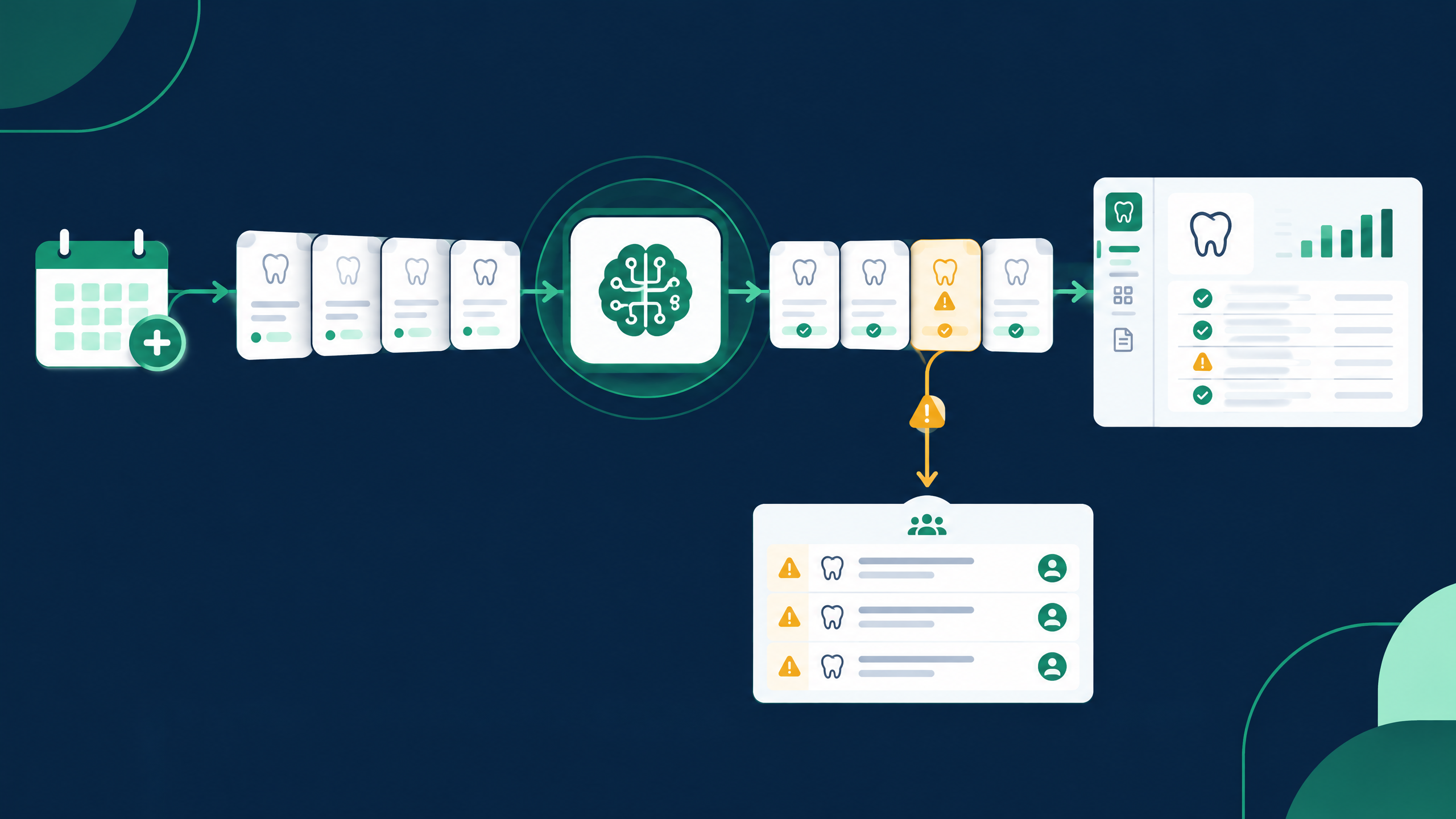
An automated claims workflow can organize the process into five stages.
- Identify submitted claims. Establish which claims are outstanding using available PMS, clearinghouse, or payer information.
- Monitor available claim status. Retrieve status information from supported sources and identify claims that may need additional review.
- Prioritize follow-up. Organize outstanding claims based on factors such as age, available status, balance, and required action.
- Perform supported follow-up tasks. Automate eligible status checks and other configured actions. Route exceptions and decisions requiring judgment to staff.
- Document activity and outcomes. Record available results and update the relevant workflow or system when supported.
The goal is to reduce the gap between identifying an outstanding claim and taking the next appropriate action.
How claims tracking fits into your dental PMS
Your practice management system is an important starting point for understanding claim activity. Automation should complement the existing workflow and use supported methods to access and update relevant information.
Dentrix claims tracking
For practices using Dentrix, evaluate how claims automation can complement existing claim-submission, insurance-administration, and outstanding-claim review processes. The objective is to make it easier to identify unresolved claims and organize the work needed to move them forward.
Eaglesoft claims tracking
Eaglesoft users should evaluate how an automated workflow can use available claim information to support monitoring, follow-up prioritization, and documentation. The goal is to reduce reliance on disconnected spreadsheets and repeated manual status checks.
WinOMS claims tracking
Organizations using WinOMS should assess how claims tracking automation can fit into their existing insurance and billing processes, including the availability of claim-status data and supported update methods.
Oryx claims tracking
Practices using Oryx should consider how automation can complement their current claims workflow, particularly how outstanding claims are identified, reviewed, and assigned for follow-up.
PMS compatibility note: These are workflow considerations, not confirmation of a direct Dentistry Automation integration. Verify supported systems, versions, and capabilities before making specific compatibility claims.
Which dental claims need follow-up first?
Not every outstanding claim requires the same response. A useful tracking process helps distinguish routine processing from claims that may need intervention.
| Claim situation | Potential next action |
|---|---|
| Recently submitted | Allow the normal processing window before checking again |
| Pending beyond the expected timeframe | Review available status and investigate the delay |
| Additional information requested | Identify the missing documentation and coordinate its submission |
| Denied claim | Review the denial reason and determine the appropriate response |
| Partially paid claim | Compare the payment with the expected reimbursement and investigate discrepancies |
| Claim with no available status | Check the appropriate source or escalate for investigation |
Follow-up timing should reflect payer requirements, claim circumstances, and internal policies. An automated system should not treat every outstanding claim as overdue.
Claims tracking vs. claims follow-up automation
The terms are related, but they describe different levels of workflow support.
| Capability | Basic tracking | Follow-up automation |
|---|---|---|
| Identify outstanding claims | Core capability | Core capability |
| View available claim status | Common | Common |
| Highlight claims requiring attention | Depends on the solution | Can be part of the workflow |
| Perform repetitive status checks | May require staff | Can be automated where supported |
| Initiate configured follow-up actions | Often manual | Can be automated where supported |
| Handle exceptions | Staff review | Staff review with automated routing where available |
A tracking dashboard can be valuable, but identifying a problem is only the first step. The operational value comes from establishing what needs to happen next and ensuring that action is taken.
Benefits of automated dental claims tracking for DSOs
For multi-location dental groups, automated claims workflows can support:
- More consistent follow-up: Establish repeatable processes for monitoring and managing outstanding claims.
- Improved visibility: Make it easier to identify aging claims and unresolved issues.
- Reduced repetitive work: Limit manual status checks and administrative documentation where automation is supported.
- Better prioritization: Focus attention on claims that require investigation or intervention.
- More structured accountability: Track work and outcomes using available workflow and reporting capabilities.
- A more scalable billing operation: Support growing claim volumes without depending entirely on additional manual monitoring.
These benefits depend on implementation, data availability, payer connectivity, and the scope of automation.
How to choose dental claims tracking software
Before selecting a solution, ask:
- Can the system identify outstanding claims from our existing workflow?
- Which clearinghouses and payer sources are supported?
- How frequently can claim status be refreshed?
- Can the system distinguish routine processing from claims requiring action?
- Does it support follow-up actions or only status monitoring?
- Can activity be documented in our PMS or another approved system?
- How are denied claims and requests for additional information handled?
- Can the workflow support multiple locations and reporting requirements?
The answers will help you determine whether a solution provides visibility alone or automates meaningful parts of the claims lifecycle.
Move beyond claim monitoring to claim resolution
An outstanding claim represents unfinished work. Without a consistent process for monitoring status, prioritizing action, and following through, billing teams can spend valuable time managing lists instead of resolving issues.
AI-powered claims tracking offers a way to automate supported monitoring and follow-up tasks while helping staff concentrate on cases requiring investigation, judgment, or escalation. For dental practices using Dentrix, Eaglesoft, WinOMS, or Oryx, the next step is to assess how claims automation can complement the existing PMS workflow.
Explore AI-powered dental RCM automation
Dentistry Automation runs verification, payment posting, and claims workflows with AI, backed by people for the exceptions. [See the workflow](/revenue-cycle-management/) or review the [Dentistry Automation Claims Tracker](/claims-tracker/) to discuss available automation capabilities and request a demonstration.